
WhatsApp Tour Booking Automation for Singapore Operators
Touris Team
7 min read

What WhatsApp Tour Booking Automation Means for Operators
WhatsApp tour booking automation for Singapore operators is not about replacing your sales team. It is about reducing repeated manual work around enquiries, confirmations, reminders, payment updates, and traveller details.
Many Singapore tour operators already use WhatsApp every day. Customers ask about dates, prices, pickup points, deposits, group size, and itinerary details. The problem is that the booking information often sits across WhatsApp chats, spreadsheets, payment screenshots, and staff memory.
Automation helps by connecting your booking workflow with WhatsApp messages at the right points. For example:
- A customer submits a booking form
- The operator receives structured traveller details
- The customer gets a WhatsApp confirmation
- Payment status is tracked separately from chat messages
- Staff can send reminders without retyping the same text
- Operations can see who has paid, who is pending, and who needs follow-up
For small tour businesses, the goal is simple: fewer missed messages, fewer manual checks, and clearer booking records.
Why Singapore Tour Operators Rely So Much on WhatsApp
WhatsApp is practical for Singapore travel businesses because customers are used to quick replies. It works well for local day tours, private tours, walking tours, overseas package tours, and Free & Easy enquiries.
Common WhatsApp booking scenarios include:
- A family asking about available dates for a private tour
- A corporate group checking group pricing
- A traveller sending passport details for a package tour
- A customer asking whether PayNow payment has been received
- A staff member reminding guests about meeting time
- An operator sending last-minute weather or pickup updates
The issue is not WhatsApp itself. The issue is using WhatsApp as the only booking system.
When every booking depends on manual chat follow-up, problems can build up quickly:
- Staff forget to ask for required traveller details
- Payment screenshots are buried in chat history
- Different staff members send different instructions
- Customers assume they are confirmed before paying
- Operations teams cannot see booking status clearly
- Follow-ups are missed during busy periods
WhatsApp automation works best when it supports a proper booking process instead of becoming a messy inbox.
Where Manual WhatsApp Booking Workflows Break Down
A common manual workflow looks like this:
- 1Customer sends a WhatsApp enquiry
- 2Staff replies with package details
- 3Customer confirms interest
- 4Staff asks for names, contact details, date, group size, and special requests
- 5Staff sends payment instructions
- 6Customer sends a PayNow screenshot
- 7Staff checks payment manually
- 8Staff updates a spreadsheet
- 9Staff sends confirmation message
- 10Staff sends reminder closer to the tour date
This can work for a small number of bookings. But as volume grows, the workflow becomes harder to control.
The main risk areas are:
- Incomplete information: Staff may forget to collect nationality, passport details, dietary needs, rooming preference, or emergency contact.
- Unclear payment status: A screenshot in WhatsApp is not the same as an organised payment record.
- Duplicate work: The same details are copied from chat to spreadsheet, then into another internal document.
- Slow response times: Staff spend time typing the same instructions instead of handling exceptions.
- No single source of truth: One person knows the booking status, but the rest of the team does not.
Automation should target these weak points first.
What to Automate in a Tour Booking WhatsApp Workflow
Not every message should be automated. Tour bookings often need human judgement, especially for custom itineraries, package changes, and group requests.
The best areas to automate are repetitive, rules-based messages.
Useful automation points include:
- Booking enquiry received
- Booking form submitted
- Deposit payment requested
- Full payment requested
- Payment status updated
- Booking confirmed
- Missing traveller details reminder
- Tour date reminder
- Meeting point or pickup instructions
- Post-booking follow-up
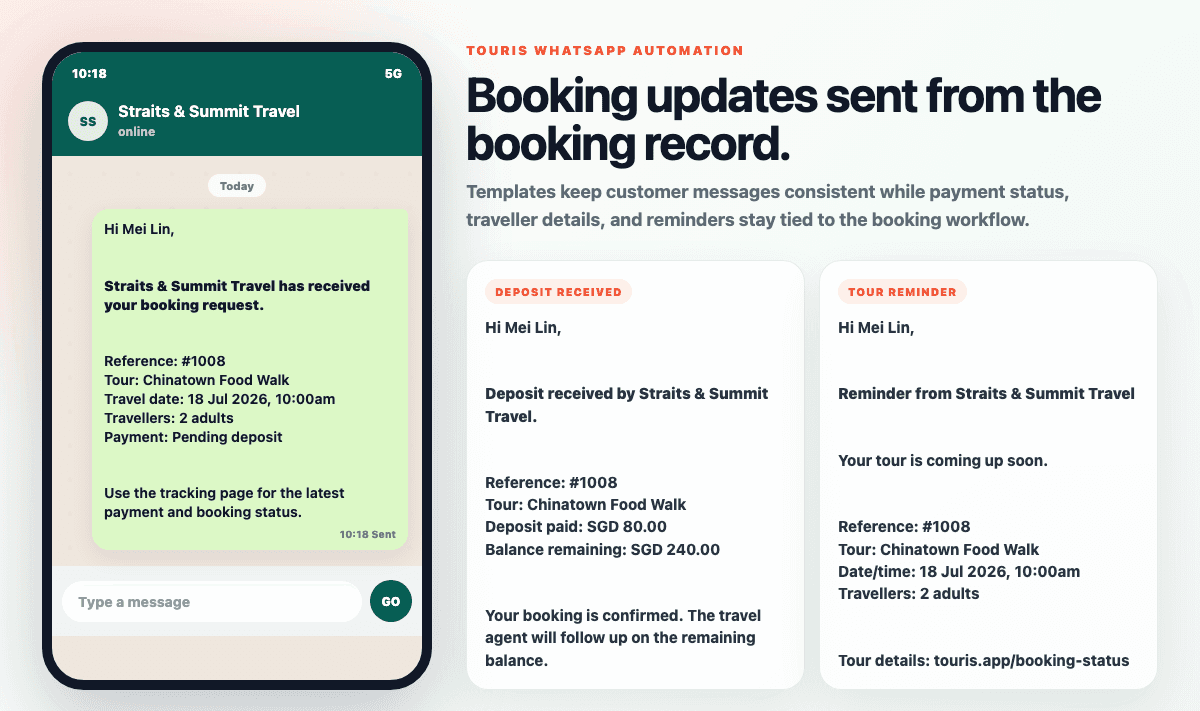
For example, after a customer submits a booking form, your system can prepare a WhatsApp confirmation with the tour name, date, number of travellers, payment status, and next step.
This saves staff from rewriting the same message while still allowing them to personalise the reply when needed.
A Practical WhatsApp Tour Booking Automation Setup
A simple setup for Singapore operators should connect four parts of the booking process.
Booking Page
Start with a booking page or enquiry form that collects structured information. This is important because WhatsApp chats are not designed to organise booking data.
Your form should collect details such as:
- Tour or package selected
- Preferred travel date
- Number of adults and children
- Lead traveller name
- WhatsApp number
- Email address if needed
- Pickup or meeting preference
- Special requests
- Required package tour details, where applicable
For package tours, you may also need passport information, rooming preferences, insurance choices, or emergency contacts. For day tours, the form may be much shorter.
Payment Tracking
Next, separate payment tracking from WhatsApp messages.
Singapore operators often collect deposits or full payments through PayNow, payment links, or providers such as HitPay. The important point is to track whether the booking is:
- Unpaid
- Deposit paid
- Fully paid
- Pending manual verification
- Cancelled or refunded
Once payment status is clear, WhatsApp updates become more reliable. Staff no longer need to search through chat threads to know whether a customer has paid.
Message Templates
Create standard WhatsApp templates for common booking stages.
Examples include:
- "Thanks, we have received your booking enquiry."
- "Your booking details are recorded. Please make deposit payment to secure your slot."
- "We have received your deposit. Your booking is now reserved."
- "Full payment is due by [date]."
- "Reminder: your tour is tomorrow. Meeting point: [location]."
Templates should be clear and operational. Avoid long messages that customers will not read.
Each message should answer:
- What has happened?
- What does the customer need to do next?
- By when?
- Who should they contact if details are wrong?
Booking Management Dashboard
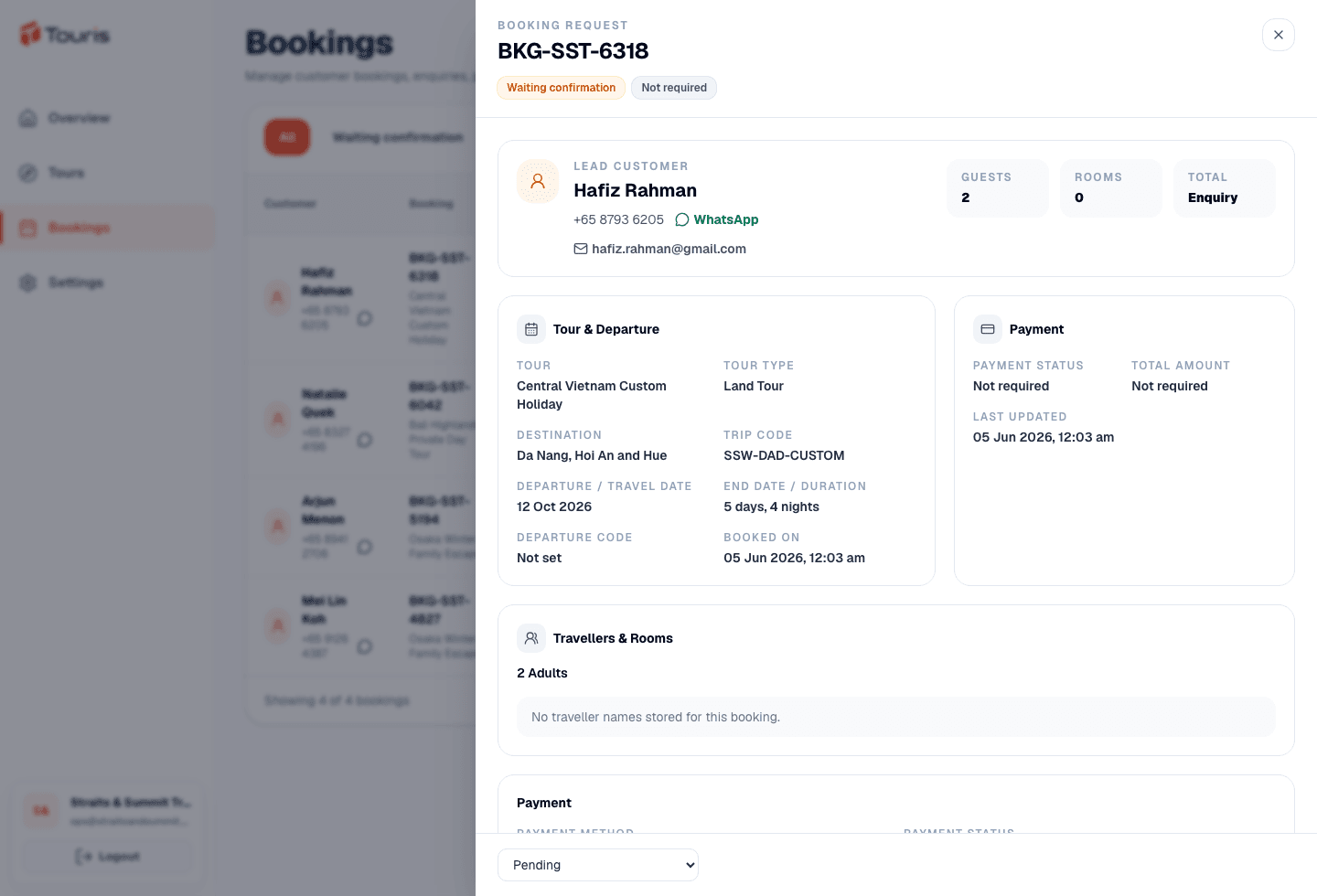
Finally, staff need one place to check bookings.
A booking dashboard should show:
- Tour date
- Customer name
- WhatsApp number
- Number of travellers
- Payment status
- Booking status
- Missing details
- Internal notes
This allows your team to use WhatsApp for communication, while the booking system remains the source of truth.
How to Keep WhatsApp Automation Human and Useful
Automation can create problems if it feels too rigid. Customers may still have questions, and tour bookings often involve changes.
To keep the workflow useful, follow these rules:
- Use automation for confirmations and reminders, not complex negotiation
- Let staff review important messages before sending where needed
- Keep message templates short and specific
- Include booking details so customers can spot mistakes early
- Avoid sending too many reminders
- Make it easy for customers to reply to a real person
For example, a reminder message should not just say "Your tour is confirmed." It should include the tour name, date, meeting point, reporting time, and what to bring.
A good operational reminder might look like:
"Reminder for your Chinatown walking tour tomorrow, 10:00am. Please meet at Exit A, Chinatown MRT, 10 minutes early. Wear comfortable shoes and bring water. Reply here if you need help."
This is more useful than a generic automated message.
Common Mistakes to Avoid
When setting up WhatsApp tour booking automation, avoid these common mistakes.
Automating Before Fixing the Booking Process
If your booking process is unclear, automation will only send unclear messages faster.
Before automation, define:
- What counts as a confirmed booking?
- Is deposit required?
- When is full payment due?
- What traveller details are mandatory?
- Who handles payment verification?
- Who handles booking changes?
Using WhatsApp as the Main Database
WhatsApp is good for communication. It is not good for reporting, payment tracking, or team visibility.
Keep booking records in a proper system, then use WhatsApp to update customers.
Sending Too Many Messages
Customers do not need a message for every internal update. Focus on messages that help them take action or reduce uncertainty.
Useful messages include payment requests, confirmations, missing information reminders, and tour reminders.
Not Standardising Staff Replies
If every staff member writes different payment instructions or cancellation terms, customers may get confused.
Create approved templates that staff can use and adjust when needed.
What to Look for in Tour Booking Software in Singapore
If you are comparing systems, look for software that supports the way Singapore operators actually work.
Important features include:
- Public booking pages for tours and packages
- Custom fields for traveller details
- Booking status tracking
- Deposit and full payment tracking
- PayNow or local payment workflow support
- HitPay support where relevant
- WhatsApp confirmations and reminders
- Internal booking notes
- Easy booking management for staff
For operators selling different tour types, flexibility matters. A walking tour booking form should not look the same as a multi-day package tour enquiry form.
Touris is built for Singapore and Southeast Asia tour operators that need booking pages, traveller detail collection, payment tracking, and WhatsApp booking updates in one workflow.
Example Workflow for a Singapore Day Tour Operator
Here is a simple workflow for a day tour operator using WhatsApp automation.
- 1Customer opens the booking page and selects a tour date
- 2Customer enters name, WhatsApp number, group size, and pickup details
- 3Booking is created with "pending payment" status
- 4Customer receives WhatsApp payment instructions
- 5Staff updates payment status after PayNow or HitPay payment is confirmed
- 6Customer receives booking confirmation by WhatsApp
- 7One day before the tour, customer receives meeting point reminder
- 8Staff checks the dashboard for all next-day bookings
This workflow keeps WhatsApp in the process, but removes the need to manage everything manually inside chat.
Example Workflow for a Package Tour Seller
Package tours usually need more information and more follow-up.
A practical workflow may look like this:
- 1Customer submits a package tour enquiry
- 2Staff reviews availability, pricing, and rooming request
- 3Staff sends a WhatsApp reply with next steps
- 4Customer submits required traveller details through a form
- 5Deposit payment is requested
- 6Booking is marked as deposit paid once verified
- 7Staff follows up for missing passport or rooming details
- 8Full payment reminder is sent before the due date
- 9Final tour briefing details are sent by WhatsApp
This is where structured booking software becomes especially useful. Package tour operations often involve more conditions, more documents, and more payment stages than simple day tours.
You can read more operational articles on the Touris blog.
Practical Takeaway
WhatsApp tour booking automation for Singapore operators works best when it is connected to a clear booking system. Do not automate random chat replies first. Start by standardising your booking form, payment tracking, confirmation messages, and reminder workflow.
Once those steps are clear, WhatsApp becomes a useful communication channel instead of a messy booking database.
If your team is still copying details between WhatsApp, spreadsheets, PayNow screenshots, and reminder messages, Touris can help you organise the workflow while keeping WhatsApp as part of your customer communication process.