
Staff-created bookings
Manual tour bookings
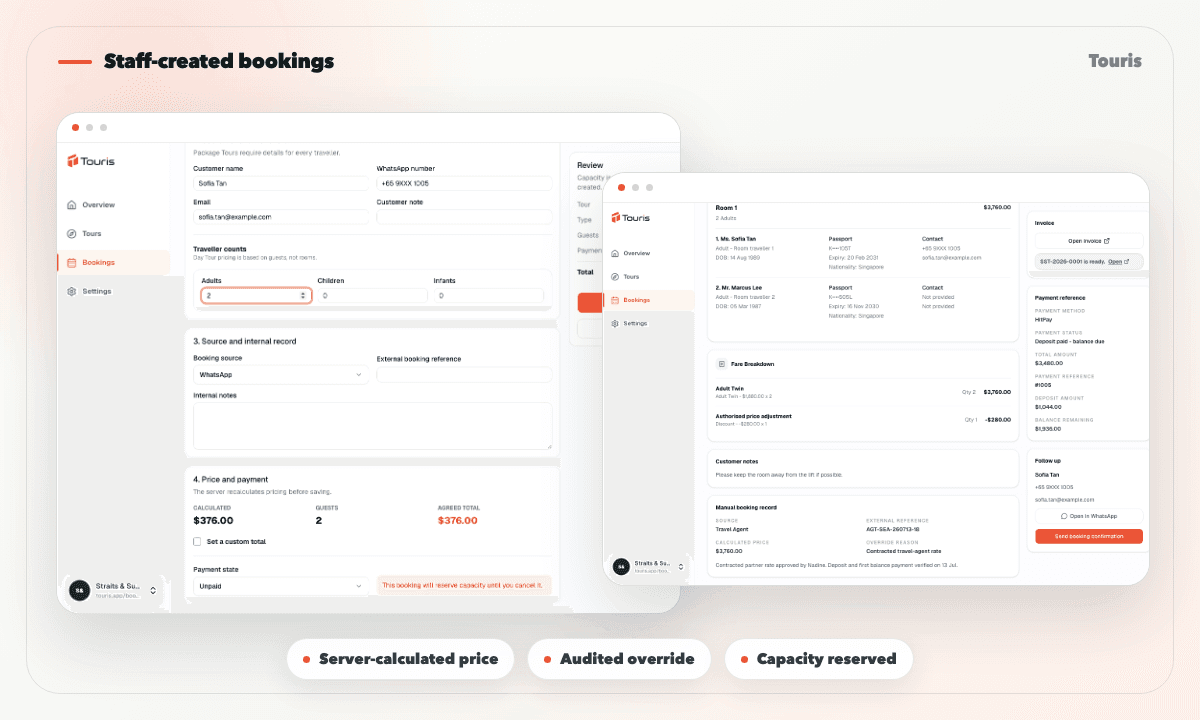
Record bookings received by phone, walk-in, WhatsApp, social, or a travel agent in the same workspace as online bookings. Touris applies server-side pricing, reserves capacity immediately, and keeps every override auditable.
Offline sales still need a real booking record
A customer may confirm by phone or chat, but staff still need accurate pricing, available capacity, traveller information, and a payment trail.
- Phone, walk-in, social, and agent bookings are easily missed when only website bookings enter the system.
- Staff-entered prices can drift from the price customers would receive online.
- Holding a seat in a spreadsheet does not reserve the matching departure or timeslot.
- External references, traveller notes, room details, and offline payments become disconnected records.
Create the booking while the customer is ready
Staff can capture the source and customer context, select the right tour schedule, review the calculated fare, and create the booking in one flow.
- 1Choose a Day Tour, Package Tour, or Free & Easy tour and record the booking source.
- 2Add the customer, external reference, notes, travellers, rooms, departure, date, or timeslot required by that tour type.
- 3Touris calculates the price on the server and shows the fare before creation.
- 4If staff agree a different price, they enter a reason and Touris stores the calculated and agreed totals for audit.
- 5The booking reserves capacity immediately and opens with its payment, invoice, and confirmation actions ready.
What staff can capture
The form adapts to the tour type instead of forcing every booking into the same generic fields.
Source and reference context
Record website, phone, walk-in, social, WhatsApp, travel-agent, or other sources plus an external booking reference.
Tour-specific booking details
Handle package departures, rooms and travellers; day-tour dates and timeslots; or Free & Easy requests and notes.
Audited price overrides
Keep the server-calculated total, agreed total, reason, and staff identity together when a custom price is used.
Immediate capacity reservation
Reserve the selected package departure or day-tour slot as soon as the booking is created.
One workflow for online and staff-created bookings
Manual entry should not mean a second operating system for the team.
Spreadsheet entry
Flexible, but disconnected from live capacity, pricing rules, payment history, and customer tracking.
Online-only checkout
Works for self-service customers but leaves phone, walk-in, agent, and chat sales outside the booking record.
Touris
Uses the same tours, pricing logic, capacity, payment tools, invoices, and customer updates for every source.
FAQ
Which booking sources can staff record?
Touris supports website, Instagram, Facebook, WhatsApp, phone, walk-in, travel-agent, and other sources, with an optional external reference.
Can staff change the calculated price?
Yes. A custom agreed total requires a reason, and Touris stores the calculated total, override reason, and staff identity for audit.
Does a manual booking reserve capacity?
Yes. Capacity is reserved immediately against the selected package departure or day-tour timeslot when the booking is created.
Can staff record offline payments during entry?
Yes. Staff can start the booking as unpaid, deposit or partially paid, or fully paid and record supported offline payment methods with verification details.
Is WhatsApp required for manual tour bookings?
No. Manual Tour Bookings for Staff works for online and staff-entered bookings. WhatsApp is optional for booking confirmations, payment updates, configurable reminders, and customer conversations.
Related Touris pages
Continue through the Touris booking workflow pages that support this topic.
Manage every booking from one clear workspace
Create tours, accept online or staff-entered bookings, manage travellers, reconcile payments, issue invoices, and send customer updates with Touris.