
Status Pages
Customer booking status pages
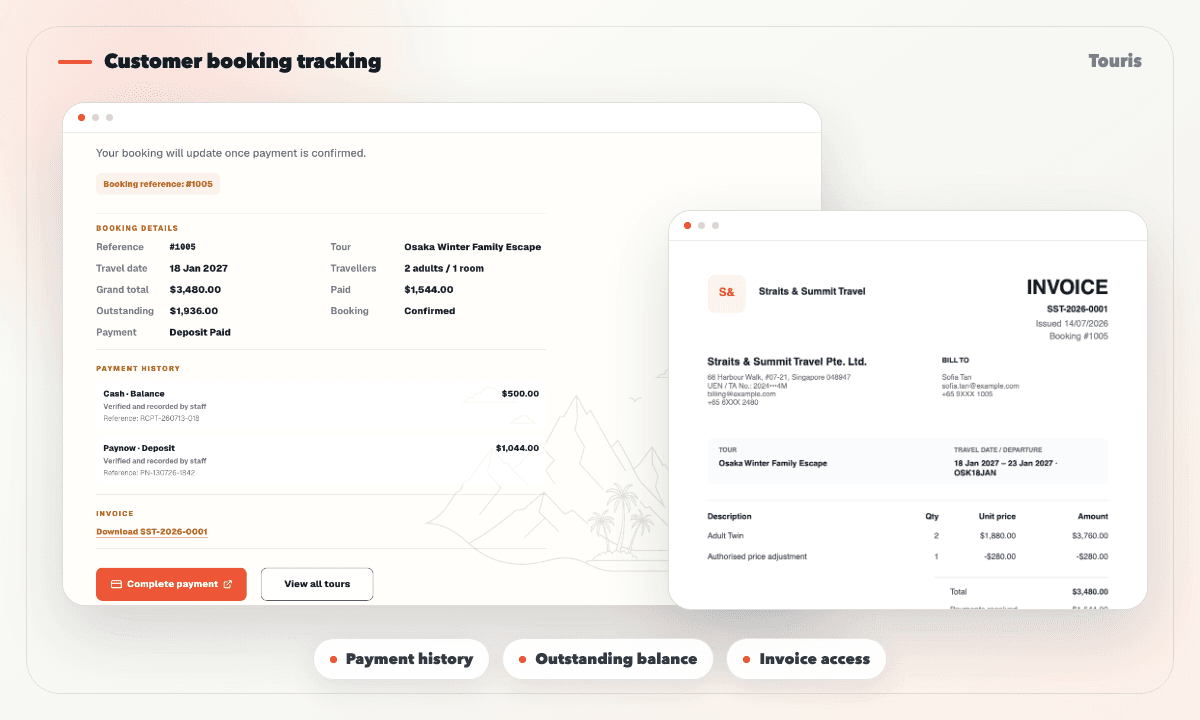
Give each customer a secure tracking page for the booking status, confirmation source, payment history, paid amount, outstanding balance, bank instructions, and issued invoices.
Customers ask status questions when the next step is unclear
After booking or payment, customers want to know whether the team has received everything and what happens next.
- Customers ask whether a payment was received and who confirmed it.
- Agents repeat the paid amount, remaining balance, and bank instructions manually.
- An invoice sent once in chat may no longer reflect the latest payment history.
- The customer cannot tell whether the booking came from online checkout or staff confirmation.
How status pages support follow-up
Touris status pages help connect customer-facing clarity with the admin booking record.
- 1Touris creates the booking online or through the staff manual-booking flow.
- 2Each completed or pending payment updates the booking-level payment history.
- 3The customer opens the secure tracking link without creating an account.
- 4The page shows booking and payment status, confirmation source, paid total, outstanding balance, and any bank or PayNow instructions.
- 5Issued invoices remain available from the same page while staff handle exceptions from the full admin booking view.
Status page capabilities
Give customers one current view of their booking, payments, outstanding balance, instructions, and invoice.
Booking and confirmation context
Show the booking reference, tour, travel schedule, current status, and whether confirmation came from the gateway or staff.
Complete payment history
List payment method, purpose, amount, status, date, and confirmation source with paid and outstanding totals.
Bank and PayNow instructions
Show the operator's configured bank, PayNow, and payment next-step details when money remains due.
Invoice access
Let customers open the current PDF invoice with itemized charges, payments received, and outstanding balance.
Status pages reduce repeated manual replies
Touris helps operators give customers enough clarity without building a complex customer portal.
Manual status replies
Useful for exceptions, but inefficient for repeated confirmation questions.
One-time receipts
Confirm one transaction, but do not show the current booking history, balance, instructions, or invoice.
Touris status page
Gives customers one current booking, payment, instruction, balance, and invoice view from any channel.
FAQ
Is this a full customer portal?
No account is required. Each customer gets a secure booking tracking page with payment history, balance details, instructions, and invoice access for that booking.
Is WhatsApp required for customer booking status pages?
No. Customer Booking and Payment Status Pages works for online and staff-entered bookings. WhatsApp is optional for booking confirmations, payment updates, configurable reminders, and customer conversations.
Can I take deposits or full payments with customer booking status pages?
Yes. Touris supports deposit and full-payment workflows based on the tour setup. Staff can also record partial and offline payments while the booking keeps the paid amount and outstanding balance current.
How are PayNow and bank transfers handled for customer booking status pages?
Staff can record and verify the payment against the booking. Touris keeps its method, purpose, reference, confirmation source, and history together, then recalculates the remaining balance. It does not automatically match bank feeds.
Does Touris distribute tours to OTAs or marketplaces?
No. Touris supports direct bookings and staff operations; it is not an OTA, marketplace, channel manager, or live supplier inventory network.
Related Touris pages
Continue through the Touris booking workflow pages that support this topic.
Manage every booking from one clear workspace
Create tours, accept online or staff-entered bookings, manage travellers, reconcile payments, issue invoices, and send customer updates with Touris.