
PDF invoices
Tour booking invoices
Generate a professional PDF invoice from a payable booking with your company details, customer information, tour schedule, itemized charges, payments received, and outstanding balance.
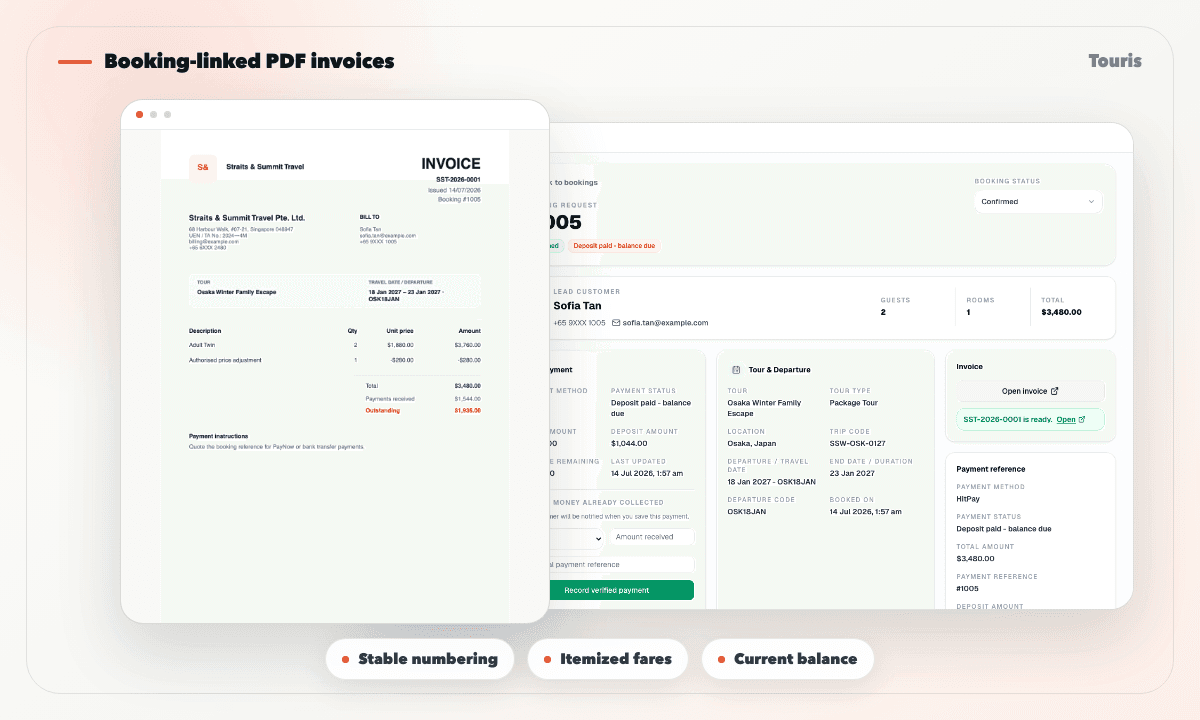
An invoice should match the booking customers are paying
Standalone invoice templates quickly fall out of step when travellers, charges, payments, or the remaining balance change.
- Staff retype customer, tour, departure, and fare details into a separate document.
- Deposit and balance payments are not reflected consistently on regenerated invoices.
- Different staff use different numbering and business details.
- Customers need to ask for the latest document because it is not available from booking tracking.
Issue once, regenerate when details change
The invoice remains tied to its booking while the issued number stays stable.
- 1Add the company, legal, tax, contact, numbering prefix, and payment instruction details in invoice settings.
- 2Open a payable booking and issue its invoice from the booking actions.
- 3Touris assigns a tenant-specific invoice number and stores the original booking snapshots.
- 4Download the PDF from the admin booking or let the customer access it from booking tracking.
- 5Regenerate later with the same invoice number and current business, fare, payment, and balance details.
What the invoice includes
Each document is designed around the booking rather than a generic free-form invoice editor.
Tenant-specific identity
Use the operator logo, company or legal name, address, registration and tax numbers, contact details, and payment instructions.
Booking and schedule context
Show the booking reference, customer, tour, travel date, departure, or day-tour time where relevant.
Itemized tour charges
List fare descriptions, quantities, unit prices, subtotals, and the current booking total.
Paid and outstanding totals
Reflect completed payments and the amount still due whenever the PDF is generated.
A customer document, not a second ledger
Touris keeps the invoice useful for booking operations without pretending to replace accounting software.
Manual document
Easy to start, but numbering, line items, payment totals, and customer versions drift over time.
Accounting invoice
Important for finance, but often detached from tour departures, rooms, travellers, and customer tracking.
Touris invoice
Stays linked to the booking and current payment balance while retaining its issued invoice number.
FAQ
Does an invoice number change when I regenerate the PDF?
No. The issued invoice number remains stable while the regenerated PDF uses current business, booking, fare, payment, and outstanding-balance details.
Can customers download their invoice?
Yes. Issued invoices are available from the customer booking tracking page as well as the admin booking page.
Can each operator use a different invoice prefix?
Yes. Invoice settings are tenant-specific and include a configurable prefix alongside company, tax, contact, and payment instruction details.
Are invoices available for Free & Easy enquiries?
Invoices are available for payable bookings with a booking total. Enquiry-only records without a payable amount do not generate an invoice.
Does Touris replace accounting software?
No. Touris provides booking-linked customer invoices and booking-level payment balances; it does not replace your accounting ledger or tax workflow.
Related Touris pages
Continue through the Touris booking workflow pages that support this topic.
Manage every booking from one clear workspace
Create tours, accept online or staff-entered bookings, manage travellers, reconcile payments, issue invoices, and send customer updates with Touris.