
Date-aware pricing
Seasonal pricing for day tours
Set a default Day Tour price, add non-overlapping seasonal ranges, and override one special date when needed. Touris resolves the same price for public checkout and staff-created bookings.
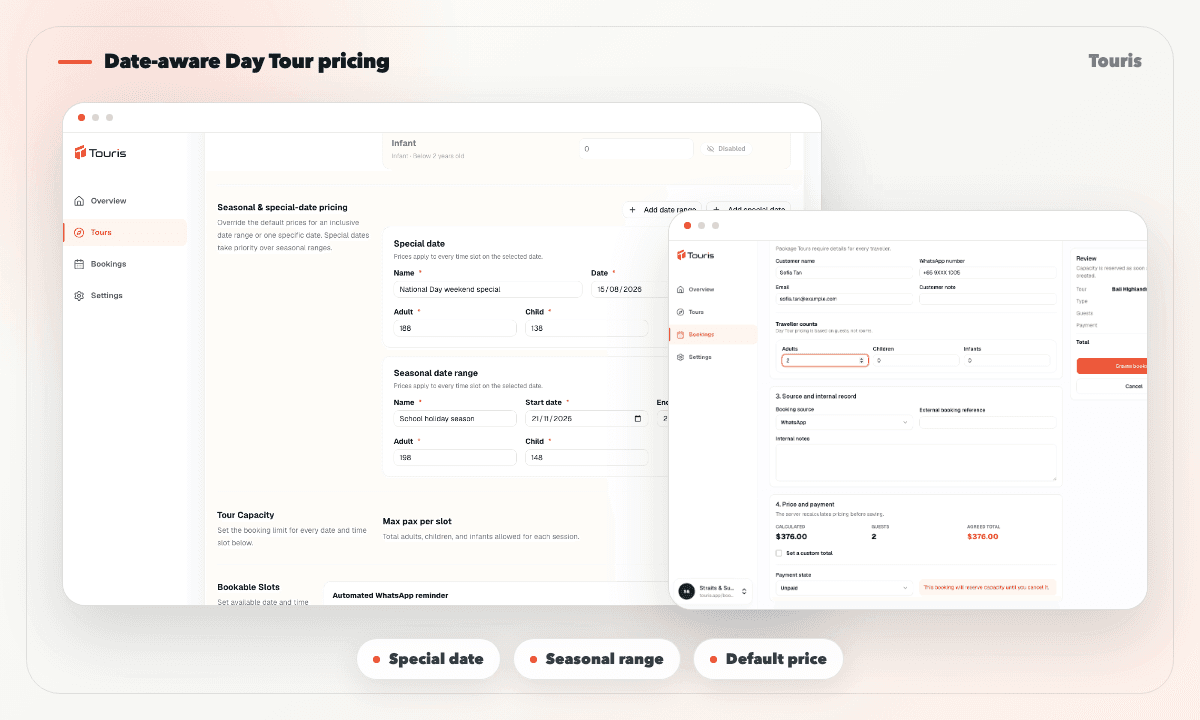
Peak dates should not depend on staff remembering a price list
When a Day Tour has different weekend, holiday, or peak-season prices, every booking channel needs to resolve the same amount.
- A single default price cannot represent peak periods and one-off special dates.
- Overlapping seasons create uncertainty about which amount should win.
- Staff-created bookings can drift from public checkout if the price is looked up manually.
- Historical bookings need the price and pricing period that were actually selected at booking time.
Resolve the right price for the selected date
Touris uses an explicit precedence order so the result is predictable for staff and customers.
- 1Set the default adult, child, and enabled fare prices for the Day Tour.
- 2Add seasonal date ranges with their own fare amounts.
- 3Add a single-day special price for a holiday or event when needed.
- 4Touris resolves special date first, then seasonal range, then default price.
- 5The selected pricing period and price snapshot are stored with the booking for later review.
Pricing rules staff can reason about
Validation prevents ambiguous ranges while the booking keeps a durable record of the resolved result.
Seasonal date ranges
Set an inclusive start and end date with specific Day Tour fares for that period.
Special-date overrides
Give one date the highest-priority fare without rewriting a whole season.
Overlap protection
Prevent overlapping seasons and duplicate special dates for the same Day Tour.
Consistent snapshots
Use the same resolver for public and manual bookings and store the selected period and fare snapshot.
Date-aware pricing without hidden precedence
Every person creating or reviewing a booking can see why a particular price applied.
Default price only
Simple, but forces staff to handle every peak period or holiday outside the booking system.
Manual price lookup
Flexible, but online checkout and staff-created bookings can disagree or lose the source period.
Touris resolver
Applies special date, season, or default in order and records the chosen pricing context with the booking.
FAQ
Which price wins when a special date is inside a season?
The special-date price wins. Touris resolves special date first, then seasonal range, then the default Day Tour price.
Can seasonal ranges overlap?
No. Touris prevents overlapping seasonal ranges and duplicate special dates for the same Day Tour.
Does seasonal pricing also change Package Tour departures?
No. Package Tour departure pricing is unchanged. Seasonal and special-date pricing applies to Day Tours only.
Will staff-created bookings use the same date price?
Yes. Public checkout and manual bookings use the same server-side resolver and store the selected pricing period and price snapshot.
Can a resolved price be zero?
Yes. Explicit zero-price bookings are preserved rather than being replaced by another fallback price.
Related Touris pages
Continue through the Touris booking workflow pages that support this topic.
Manage every booking from one clear workspace
Create tours, accept online or staff-entered bookings, manage travellers, reconcile payments, issue invoices, and send customer updates with Touris.