
Booking Pages
Hosted tour booking pages
Publish mobile-friendly Package Tour, Day Tour, and Free & Easy pages with itinerary details, inclusions, exclusions, tour-specific terms, media, pricing, and the right customer flow.
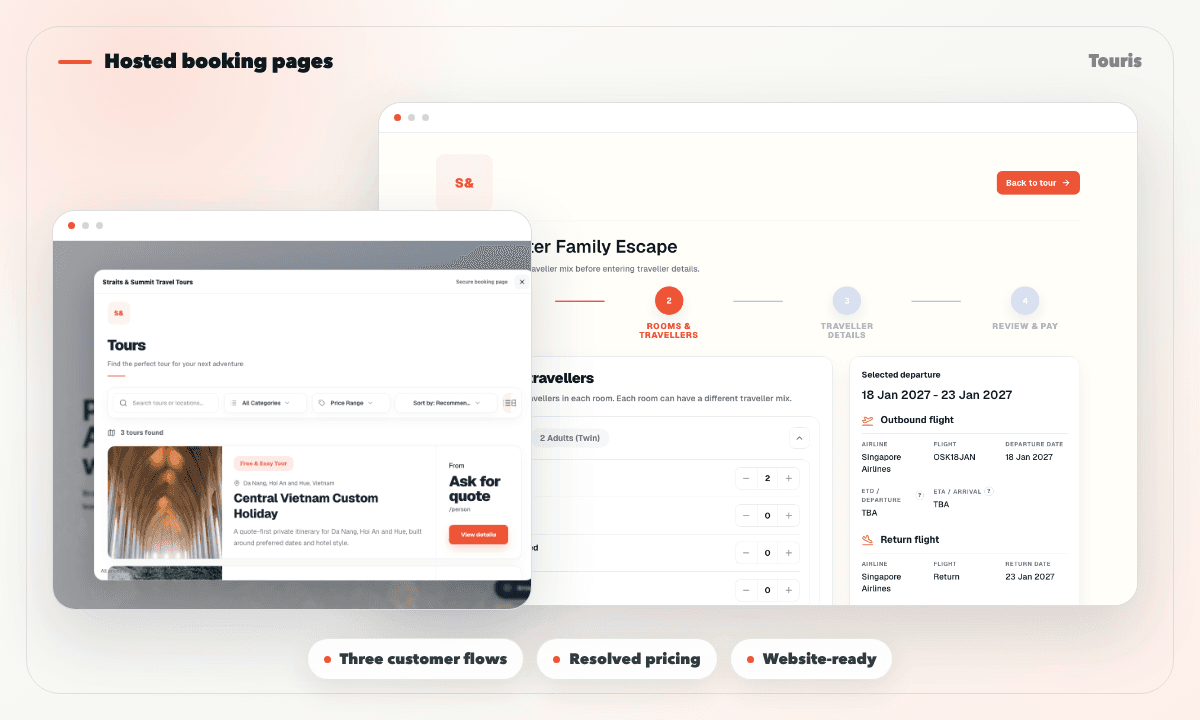
A tour page should do more than collect a message
Many operators already have a website or social audience, but the final booking step still depends on unstructured messages and manual price explanations.
- Package Tour customers need departures, room fares, traveller details, and deposit context.
- Day Tour customers need the right date, timeslot, remaining capacity, and resolved seasonal price.
- Free & Easy customers need a flexible request flow rather than premature checkout.
- Generic pages rarely connect tour terms, payments, booking tracking, and the staff record behind the sale.
How hosted booking pages work
Touris booking pages are designed for direct customer action from chat or a website.
- 1Create a page for a package tour, day tour, or Free & Easy enquiry.
- 2Add the overview, destination, itinerary, inclusions, exclusions, media, FAQs, and tour-specific terms.
- 3Configure reviewed departures, dates, timeslots, capacity, room fares, seasonal prices, deposits, and payment methods as relevant.
- 4Share the hosted link directly or connect it to the existing website with the booking widget.
- 5The customer completes the mobile flow designed for that tour type.
- 6Touris stores the pricing and inventory snapshot, reserves capacity, and opens the booking tracking and payment workflow.
Booking page capabilities
Publish a focused, mobile-friendly path from tour discovery to traveller details, pricing, and payment.
Complete tour content
Publish itinerary, overview, inclusions, exclusions, media, FAQs, and tour-specific terms without rebuilding your website.
Three distinct tour flows
Use departure-and-room Package Tours, date-and-timeslot Day Tours, and enquiry-led Free & Easy journeys.
Resolved pricing and capacity
Show the correct departure or Day Tour date price, then reserve the selected capacity when a payable booking is created.
Payment and tracking handoff
Connect deposits or full payment to customer tracking, payment history, outstanding balance, bank instructions, and invoices.
Booking pages vs basic web pages
Touris pages are meant to move the customer into a booking workflow, not just describe the tour.
Brochure page
Explains the tour, but usually sends the customer back to manual chat.
Contact form
Captures a lead, but often lacks tour-specific booking and payment context.
Touris booking page
Combines tour content, tour-specific forms, resolved pricing, capacity, payments, tracking, invoices, and optional follow-up.
FAQ
Can I use hosted tour booking pages with my existing website?
Yes. Keep your existing website and connect it to a hosted Touris page or booking widget. Staff can also create bookings received through phone, walk-in, social, travel-agent, or WhatsApp channels.
Can I take deposits or full payments with hosted tour booking pages?
Yes. Touris supports deposit and full-payment workflows based on the tour setup. Staff can also record partial and offline payments while the booking keeps the paid amount and outstanding balance current.
Can booking pages support different tour types?
Touris supports booking workflows for package tours, day tours, and Free & Easy enquiry-first journeys.
Is WhatsApp required for hosted tour booking pages?
No. Hosted Tour Booking Pages works for online and staff-entered bookings. WhatsApp is optional for booking confirmations, payment updates, configurable reminders, and customer conversations.
Does Touris distribute tours to OTAs or marketplaces?
No. Touris supports direct bookings and staff operations; it is not an OTA, marketplace, channel manager, or live supplier inventory network.
Related Touris pages
Continue through the Touris booking workflow pages that support this topic.
Manage every booking from one clear workspace
Create tours, accept online or staff-entered bookings, manage travellers, reconcile payments, issue invoices, and send customer updates with Touris.