Day Tour Operators
Day tour booking software
Touris gives Day Tour teams mobile booking pages, staff entry, date and timeslot capacity, seasonal pricing, payment reconciliation, invoices, and configurable customer updates.
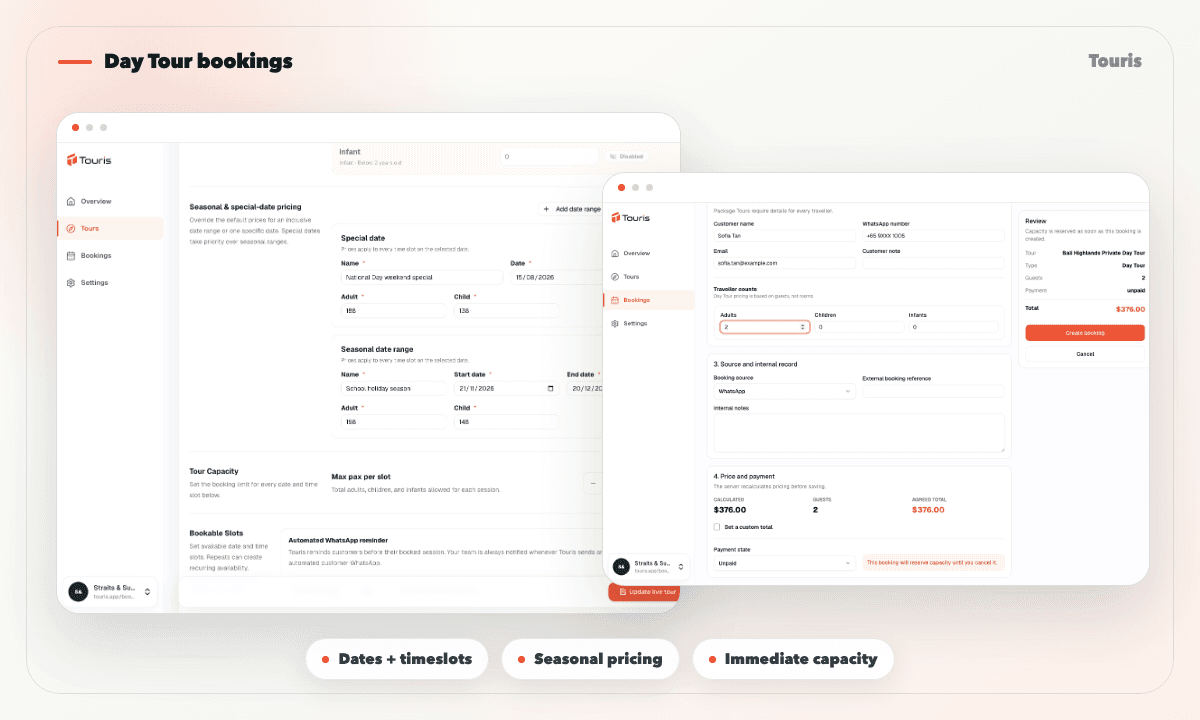
Day tour bookings should not need heavy admin
Day tour customers often decide quickly. The slower the booking and payment process feels, the easier it is for them to drop off or ask the same questions again.
- Customers and staff need the same answer for dates, timeslots, capacity, and the price on that day.
- Peak seasons and one-off special dates are easy to price inconsistently across booking channels.
- Offline payment proof and outstanding balances become difficult to reconcile at higher volume.
- Operations need a current view of who is joining, how much has been paid, and what still needs action.
A Day Tour flow from date selection to confirmation
Customers can self-serve on mobile while staff can create the same booking for phone, walk-in, agent, social, or chat sales.
- 1Configure available dates and timeslots, maximum capacity, default prices, seasonal ranges, and special-date overrides.
- 2The customer books online or staff select the same date and timeslot in the manual booking form.
- 3Touris resolves special date, then seasonal range, then default price and reserves capacity immediately.
- 4Record HitPay or offline payments and keep the payment history and outstanding balance on the booking.
- 5Share the tracking page, invoice, explicit WhatsApp confirmation, or configurable pre-tour reminder as needed.
Day tour features to highlight
Give customers a short mobile flow while staff retain control of dates, timeslots, capacity, and the price that applied.
Dates, timeslots, and capacity
Let customers or staff select an available schedule and reserve its remaining capacity immediately.
Seasonal and special prices
Apply special-date, seasonal-range, or default fares in a predictable order and store the selected pricing snapshot.
Online and manual bookings
Use the same tour schedule, capacity, and server-calculated price for public checkout and staff entry.
Payments and customer updates
Reconcile payments, issue invoices, show customer tracking, and send configurable confirmations or reminders.
Built for direct day-tour sales
Touris gives smaller day-tour teams a practical booking layer without channel manager or marketplace complexity.
Chat or phone only
Fast for conversation, but weak for timeslot capacity, date pricing, payment history, and customer tracking.
Website form
Captures interest, but often leaves confirmation and payment tracking to manual follow-up.
Touris
Combines schedules, capacity, date-aware pricing, online and staff bookings, payments, invoices, and customer updates.
FAQ
Is WhatsApp required for day tour booking software?
No. Day Tour Booking Software works for online and staff-entered bookings. WhatsApp is optional for booking confirmations, payment updates, configurable reminders, and customer conversations.
Can I take deposits or full payments with day tour booking software?
Yes. Touris supports deposit and full-payment workflows based on the tour setup. Staff can also record partial and offline payments while the booking keeps the paid amount and outstanding balance current.
Can Touris send reminders for day tours?
Yes. Operators can enable booking-aware WhatsApp reminders and configure how many hours before the tour they should be sent.
Can I use day tour booking software with my existing website?
Yes. Keep your existing website and connect it to a hosted Touris page or booking widget. Staff can also create bookings received through phone, walk-in, social, travel-agent, or WhatsApp channels.
Does Touris distribute tours to OTAs or marketplaces?
No. Touris supports direct bookings and staff operations; it is not an OTA, marketplace, channel manager, or live supplier inventory network.
Related Touris pages
Continue through the Touris booking workflow pages that support this topic.
Manage every booking from one clear workspace
Create tours, accept online or staff-entered bookings, manage travellers, reconcile payments, issue invoices, and send customer updates with Touris.