
Payment Tracking
Tour payment tracking
Touris keeps every HitPay and offline payment connected to the booking, then reconciles the recorded amounts into payment history, paid total, outstanding balance, and the next collection step.
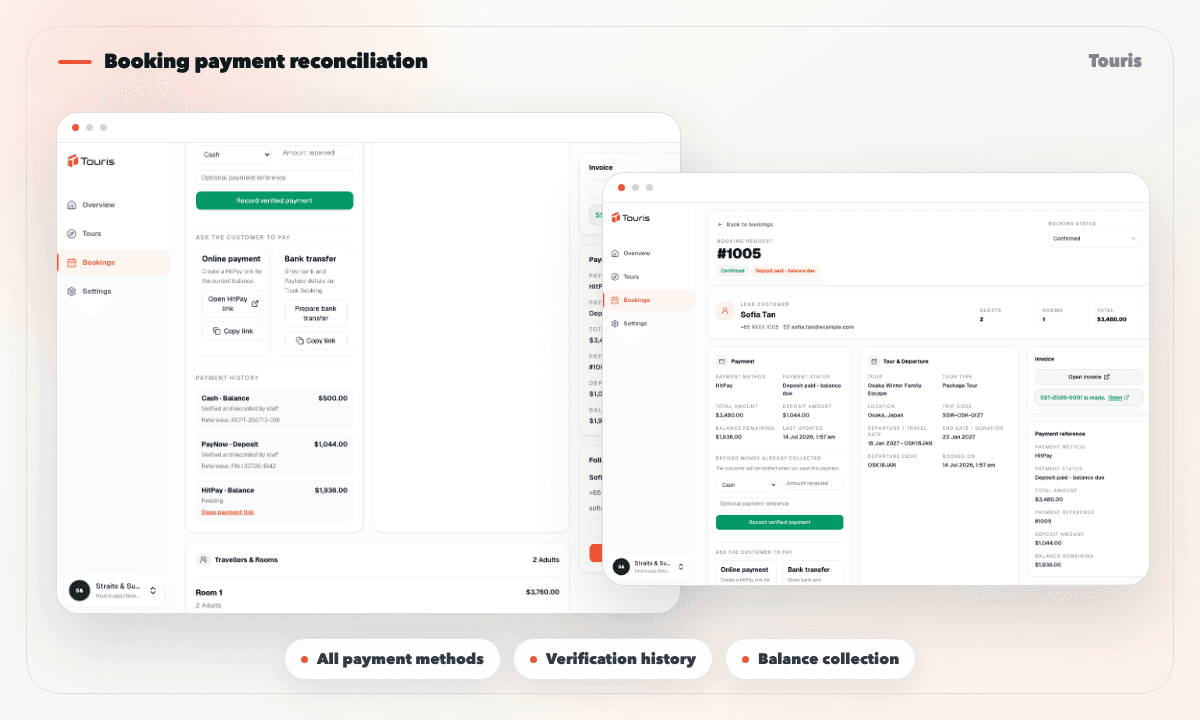
Payment status needs to be visible before follow-up
Staff need the full payment trail, who verified it, and the current balance before they reply to a customer or issue an updated invoice.
- Payment method, purpose, amount, external reference, status, and booking reference need one history.
- Unpaid, pending verification, deposit or partially paid, and fully paid bookings need clear operational labels.
- Offline methods require a visible staff-verification trail rather than an unexplained status change.
- Customers need the paid amount, balance, bank instructions, invoice, and confirmation source without another chat reply.
How booking payment reconciliation works
Touris keeps payment state attached to the booking record instead of treating it as a separate finance note.
- 1A booking starts with its agreed total, deposit context, customer, tour, and fare breakdown.
- 2Record a pending or completed HitPay, bank transfer, PayNow, cash, external card, travel-agent, or other supported payment.
- 3Staff verify offline payments and Touris stores the verifier, timestamp, reference, and confirmation source.
- 4Touris recalculates the paid total, outstanding balance, and booking payment state from completed payments.
- 5Collect the balance with HitPay where enabled, issue an updated invoice, and give the customer the current tracking view.
Payment status features
See what was collected, how it was confirmed, and what remains due without reconstructing the payment trail from chat.
Payment history
Keep every method, purpose, amount, reference, state, confirmation source, and timestamp in order.
Paid and outstanding totals
Reconcile completed payments against the booking total and show the current balance everywhere it matters.
Balance collection
Create a HitPay link for the remaining balance where enabled or record the customer's offline balance payment.
Staff verification audit
Preserve who verified an offline payment and when, alongside the booking and customer-facing confirmation source.
Booking reconciliation without accounting complexity
Touris reconciles recorded payments against each booking and keeps staff verification auditable. It does not replace bank feeds or accounting software.
Chat proof
Useful as customer evidence, but weak as the payment status layer for the booking team.
Accounting tools
Important after the transaction, but not designed for tour schedules, customer booking tracking, or operational follow-up.
Touris
Keeps payment history, reconciliation, verification, balance collection, invoice, and customer tracking with the booking.
FAQ
Can I take deposits or full payments with tour payment tracking?
Yes. Touris supports deposit and full-payment workflows based on the tour setup. Staff can also record partial and offline payments while the booking keeps the paid amount and outstanding balance current.
How are PayNow and bank transfers handled for tour payment tracking?
Staff can record and verify the payment against the booking. Touris keeps its method, purpose, reference, confirmation source, and history together, then recalculates the remaining balance. It does not automatically match bank feeds.
Is Touris accounting software?
No. Touris provides booking-level payment history, staff verification, paid totals, and outstanding balances. It does not replace accounting software or automatically match bank feeds.
Is WhatsApp required for tour payment tracking?
No. Tour Payment Tracking works for online and staff-entered bookings. WhatsApp is optional for booking confirmations, payment updates, configurable reminders, and customer conversations.
Does Touris distribute tours to OTAs or marketplaces?
No. Touris supports direct bookings and staff operations; it is not an OTA, marketplace, channel manager, or live supplier inventory network.
Related Touris pages
Continue through the Touris booking workflow pages that support this topic.
Manage every booking from one clear workspace
Create tours, accept online or staff-entered bookings, manage travellers, reconcile payments, issue invoices, and send customer updates with Touris.