
Website Booking Widget
Tour booking widget
Add a clear booking entry point to the website you already have. Customers enter the right Package Tour, Day Tour, or Free & Easy flow while Touris creates the operational record behind it.
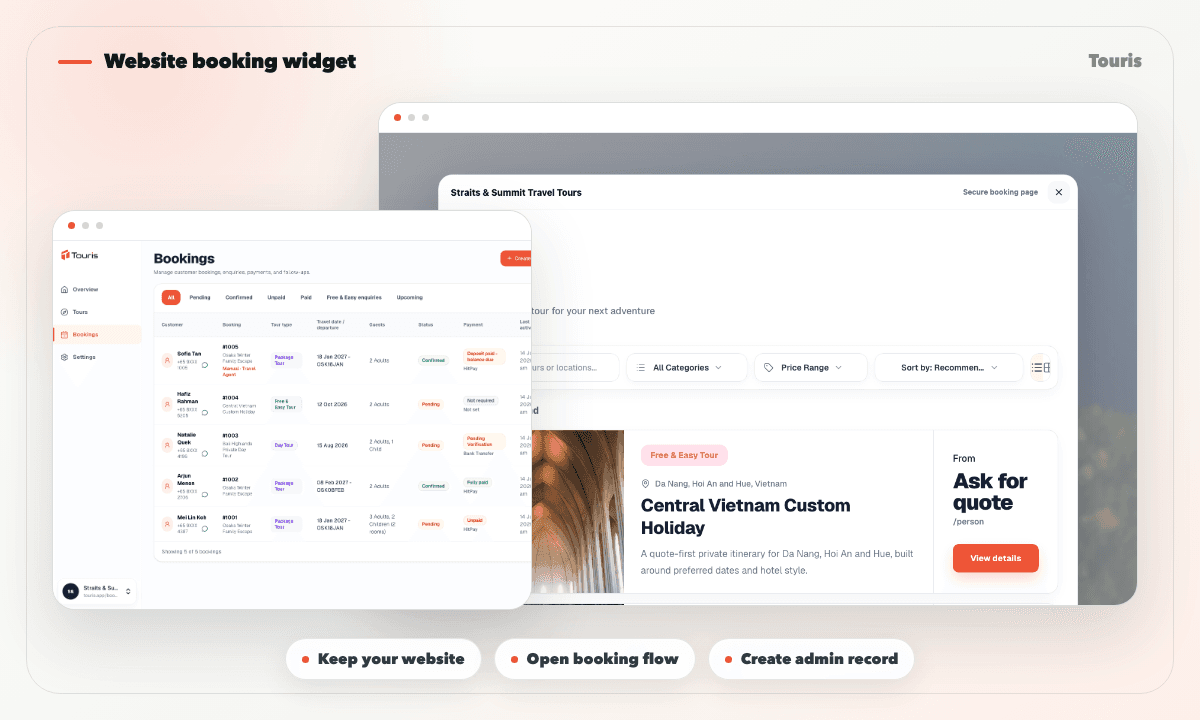
A website should not send every ready customer back to manual chat
Many operators already have a useful marketing site, but the final step still depends on a generic contact form or an unstructured conversation.
- Customers read the tour page but still need to ask how to book.
- Contact forms create leads, not complete booking records.
- A generic form does not resolve a departure, timeslot, room fare, or seasonal price.
- Capacity, traveller details, payment history, and the customer balance still need a separate record.
Add booking without rebuilding the site
Keep the website that already works for discovery and connect it to a structured Touris booking flow.
- 1Keep the operator website as the main marketing site.
- 2Add the Touris widget and connect it to the operator's hosted tour catalogue.
- 3Customers open the relevant Package Tour, Day Tour, or Free & Easy flow without the operator rebuilding the site.
- 4Touris applies the configured pricing and capacity rules when the customer books.
- 5Staff manage the resulting traveller details, payments, invoice, tracking page, and optional customer updates from the booking record.
Widget workflow features
Add a clear booking entry point to your current website without rebuilding the whole site.
Website booking widget
Connect your existing site to a Touris booking flow.
Hosted booking pages
Use standalone pages when a direct link is better than an embedded flow.
Payment tracking
Keep supported online and offline payments, verification history, paid amount, and outstanding balance with the booking.
Operational booking record
Create the same admin booking, capacity, invoice, tracking, and customer-update workflow used by every other channel.
Keep the site, improve the booking path
Touris lets operators improve booking conversion without starting a full website rebuild.
Existing website only
Good for explaining tours, but often weak at collecting booking-ready details.
Website rebuild
Can be expensive and slow if the core problem is the booking flow.
Touris widget
Adds a tour-specific booking path while the existing website continues to handle discovery and brand content.
FAQ
Can I use tour booking widget with my existing website?
Yes. Keep your existing website and connect it to a hosted Touris page or booking widget. Staff can also create bookings received through phone, walk-in, social, travel-agent, or WhatsApp channels.
Is Touris a website builder?
No. Touris provides hosted tour pages and a booking widget that connect to the booking workflow; it does not replace your marketing website.
Can I take deposits or full payments with tour booking widget?
Yes. Touris supports deposit and full-payment workflows based on the tour setup. Staff can also record partial and offline payments while the booking keeps the paid amount and outstanding balance current.
Is WhatsApp required for tour booking widget?
No. Website Booking Widget works for online and staff-entered bookings. WhatsApp is optional for booking confirmations, payment updates, configurable reminders, and customer conversations.
Does Touris distribute tours to OTAs or marketplaces?
No. Touris supports direct bookings and staff operations; it is not an OTA, marketplace, channel manager, or live supplier inventory network.
Related Touris pages
Continue through the Touris booking workflow pages that support this topic.
Manage every booking from one clear workspace
Create tours, accept online or staff-entered bookings, manage travellers, reconcile payments, issue invoices, and send customer updates with Touris.